1. Export a CSV file from Krock.io
To export comments from Krock.io, select the video and open the menu via the three dot icon. Select "Export comments to csv" to export the comments.
2. Use the "Prevodník značiek" to convert the CSV file into a CSV file
Open the free Prevodník značiek, select "Krock.io > Comments (.csv)" and set "convert" to "CSV for Google Sheets". Generate and download the file. Ak máte problémy s prevodom súboru, môžete kontaktovať bezplatnú podporu.
3. Import the CSV file into Google Sheets
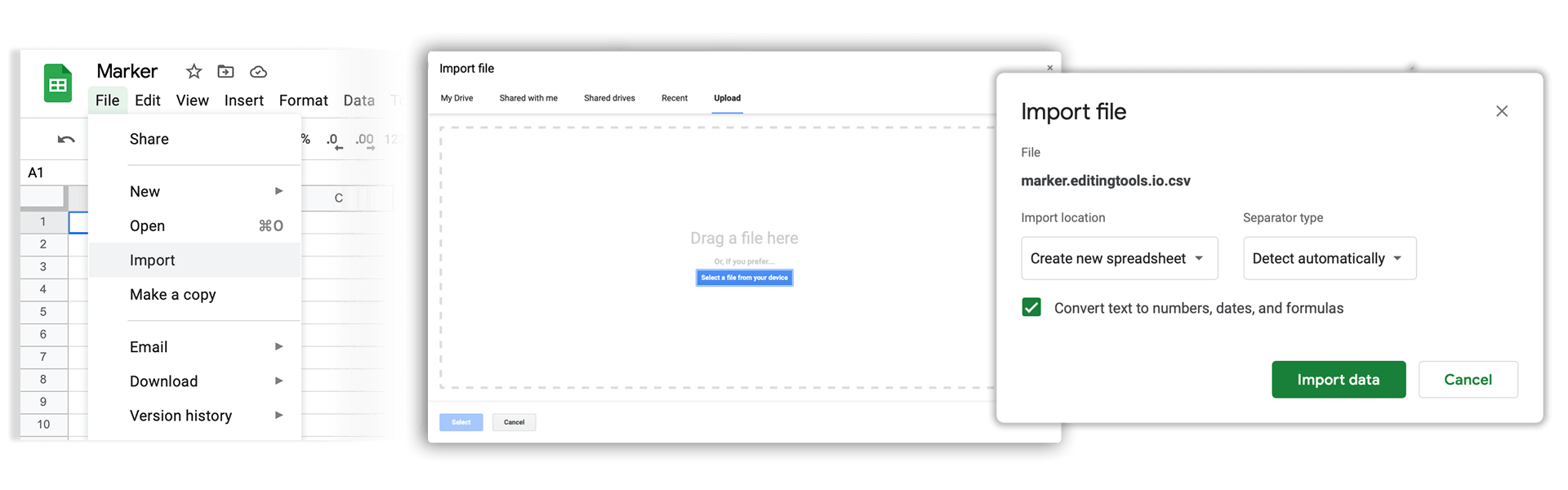
Open Google Sheets and go to "File -> Import". Upload the generated CSV file and press "Import Data" to generate the Sheet with all markers.
🚀 Hotovo
To je zatiaľ všetko! Ak vám bol tento návod užitočný, zdieľajte ho, prosím, a podporte nás tým. Ak máte návrhy, ako by sme mohli workflow vylepšiť, dajte nám vedieť!